Pine Script v6 Errors That Stop Your Script Compiling
The Pine v6 mistakes that actually break a TradingView build, what each error means, and the ones that compile cleanly and still draw nothing on your chart.
Key Takeaways
- Most Pine build failures are naming problems, not logic problems.
- Style constants belong to the function that uses them, so plot takes plot.style_ values.
- A loop bounded by size minus one runs backwards on an empty collection instead of skipping.
- A script can compile perfectly and still draw nothing.
Most of the time a Pine script fails to compile, the idea was fine. The name was wrong.
That is worth saying plainly, because the error messages rarely say it. TradingView tells you an argument is unknown; it does not tell you the argument you wanted is spelled differently. So people rewrite working logic trying to fix a spelling problem.
Below are the failures that come up most, taken from generated and hand-written scripts that were run through the TradingView compiler until they built cleanly. They are ordered roughly by how much time they waste.
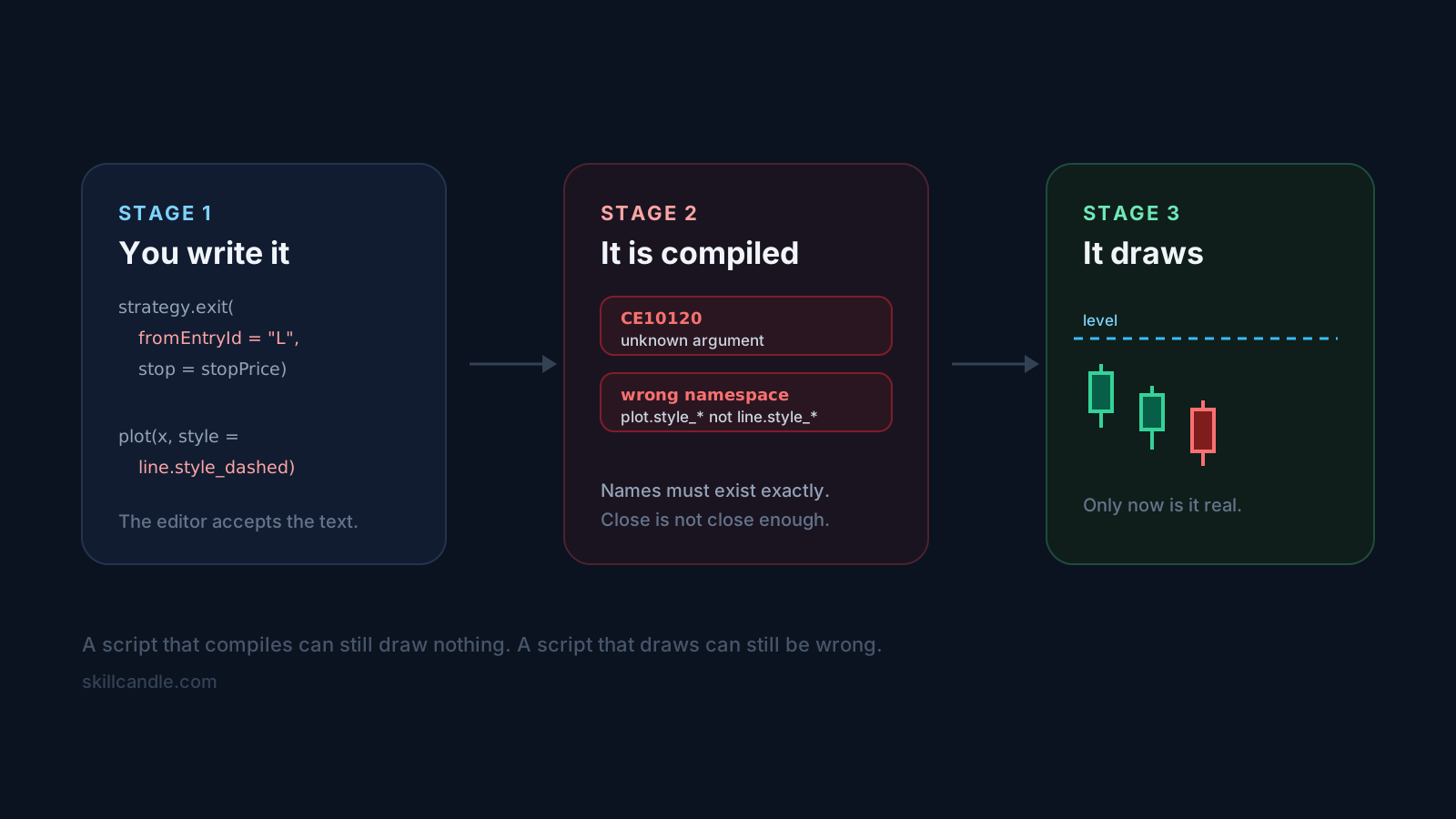
Argument names have to match exactly
Pine uses snake_case for named arguments, and there is no fuzzy matching. The one that catches almost everyone is the bracket exit:
// Fails: CE10120, unknown argument
strategy.exit("Exit L", fromEntryId = "Long", stop = stopPrice, limit = targetPrice)

// Correct
strategy.exit("Exit L", from_entry = "Long", stop = stopPrice, limit = targetPrice)
fromEntryId and fromEntry both look reasonable. Neither exists. The same applies across the order calls: strategy.entry, strategy.order, strategy.close, strategy.close_all, strategy.cancel and strategy.cancel_all all reject arguments they do not define, and the error names the argument rather than the fix.
Style constants belong to the function using them
Pine has several families of style constant, and they are not interchangeable. A dashed line is line.style_dashed when you are drawing a line object, and plot.style_linebr and friends when you are plotting a series.
// Fails: line styles are not plot styles
plot(level, style = line.style_dashed)

// Correct for a plotted series
plot(level, style = plot.style_linebr)

// line.style_dashed is for line objects
line.new(bar_index[10], level, bar_index, level, style = line.style_dashed)
If you want a dashed horizontal level on a price pane, hline with hline.style_dashed is usually what you actually want.
A loop over an empty collection runs backwards
This one compiles, passes review, and then fails at runtime on a specific bar, which makes it much more expensive than a build error.
// Runtime error when the array is empty:
// "Index 0 is out of bounds, array size is 0"
for i = 0 to array.size(zones) - 1
    zone = array.get(zones, i)
When array.size(zones) is 0, the bound becomes 0 to -1. Pine does not skip that loop. It counts downward from 0 to -1, so the body executes once and immediately reads index 0 of an empty array. The failure surfaces only on the first bar where the collection happens to be empty, which can be hundreds of bars into history.
// Guard it explicitly
if array.size(zones) > 0
    for i = 0 to array.size(zones) - 1
        zone = array.get(zones, i)
Types and functions that sound right but do not exist
Pine's type system is narrower than it appears. Collections of drawing objects exist for line, label, box and table, but not for everything you can plot.
// None of these exist
var shapes = array.new_shape()
myShape = shape.new(bar_index, close)
shape.delete(myShape)
shape is a set of constants used by plotshape, not an object type with a constructor. If you need to manage drawings yourself, use label or line objects, which do have new and delete.
The same caution applies to function declarations. Pine has no func keyword:
// Fails
func atrStop(len) =>
    ta.atr(len) * 2

// Correct
atrStop(len) =>
    ta.atr(len) * 2
The script compiles and draws nothing
This is the most frustrating category because there is no error to search for.
The usual cause is display:
// Compiles, and never appears on the price pane
plot(sessionHigh, display = display.data_window)
display.data_window sends the value to the data window only. If you want it on the chart, either omit display or use display.all.
The second cause is not a code problem at all. If your levels are hundreds of points away from price, the indicator may have been added to its own scale rather than pinned to the price scale. A quick way to tell the difference: markers placed with location.absolute at a price near close will render correctly even when far-away levels do not, which points at scaling rather than at your plot calls.
Smaller things that still stop a build
- Using a variable before it is declared. Pine reads top to bottom. A helper referenced above its own declaration fails even though the name exists further down.
- An
ifbody with only a comment. Pine expects a statement. A commented-out body is an empty block. naon its own line.nais a value, not a statement.alert()andalertcondition()for the same signal. Both build, and you get duplicate alerts. Pick one:alert()for dynamic messages inside logic,alertcondition()for a condition users wire up themselves.
Typed tuple destructuring, on the other hand, is legal and worth knowing:
[float dayLow, float dayHigh, int dayTime] = request.security(...)
Where practice fits
None of this makes a strategy good. A script that compiles and draws correctly can still lose money, and the reason is usually the rules rather than the code. A session-range strategy that exits every position at the session close will cap its winners no matter how cleanly it is written.
That is the part worth spending time on: whether the idea survives contact with bars you have not seen yet. Reading a rule correctly on a live chart, before you know the outcome, is a different skill from writing it — and it is the one that decides whether the script was worth building.
Review checklist
Before you trust a new script
- Confirm it builds with no errors, not just no warnings
- Check something actually appears on the price pane, not only in the data window
- Run it over a period where your collections would be empty
- Read the plotted levels against the bars and confirm they mark what you meant
- Judge the rules separately from the code, on charts you have not already studied
Next step
Replay strategy code setups inside SkillCandle
Move from reading about the setup to actually practicing it with a partial chart, replay reveal, and tracked review notes.
FAQ
Questions traders ask about this topic
Why does my strategy.exit call fail with an unknown argument error?
Pine argument names use snake_case and must match exactly. The common trip-up is from_entry, which people write as fromEntryId or fromEntry. TradingView reports it as CE10120, an unknown argument, rather than suggesting the correct name.
My script compiles but nothing appears on the chart. Why?
The most frequent cause is display = display.data_window, which sends the output to the data window only and never draws on the price pane. A plot with a valid series and no visible output is usually a display or scale problem, not a logic problem.
What causes index 0 is out of bounds in Pine?
Usually a loop written as for i = 0 to array.size(arr) - 1. When the array is empty that upper bound is -1, and Pine counts downward rather than skipping the loop, so the body runs and reads index 0. Guard the loop with an explicit size check.
Is Pine Script v6 different enough from v5 to break my script?
Most v5 code still works, but v6 is stricter about types and some namespaces changed. If you are copying older snippets into a v6 script, expect namespace and type errors rather than logic errors.
Related Reads
Keep building the cluster
Breakout Retest Trading Setup Guide
Practise breakout retests in replay and learn whether a retest is constructive or already losing acceptance, with fewer false-breakout mistakes.
ATR Stop Placement for Replay Traders
Use ATR as a stop-placement reference in replay practice so stops reflect volatility rather than a random distance, combined with structure and sizing.
Crypto Trading Practice Simulator [Updated 2026]
Practice crypto trading with replay instead of random chart watching. This 2026 guide covers crypto trading practice, BTC/ETH/SOL replay, and review loops.